Allstate · Liability decision support
Liability Analysis Tool
Turning accident evidence into explainable liability guidance
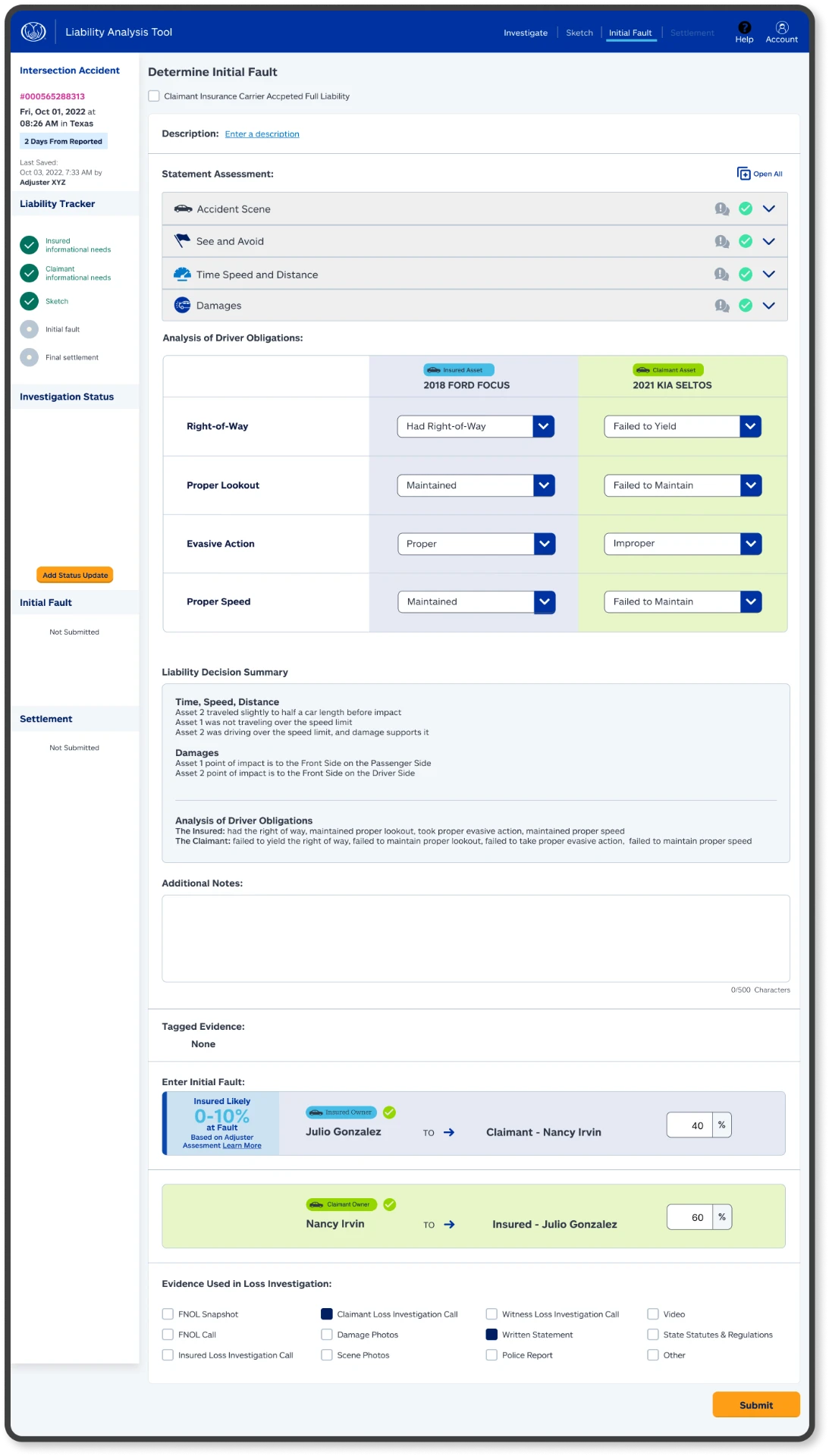
The Liability Analysis Tool helps claims adjusters gather both parties’ accounts, review statements and visual evidence, identify conflicting information, and work toward a supported liability decision within one connected desktop workflow.
This case study presents my UX/UI design, workflow and information-architecture work for the Liability Analysis Tool, a real Allstate product used by claims adjusters. I created an interactive Figma prototype using synthetic or anonymized sample information so the workflow could be demonstrated without exposing real customer data.
- Role
- Sole Product Designer
- Company
- Allstate
- Product
- Liability Analysis Tool
- Platform
- DESKTOP WEB only
- Deliverable
- Interactive Figma prototype
- Status
- Production tool · In use
Project at a glance
- Challenge
- Accident evidence can span two parties’ accounts, recorded statements, photographs, scene details, and conflicting information. The experience needed to make that evidence easier to follow without hiding how a liability decision was supported.
- My role
- As the sole product designer, I owned the workflow and information architecture, UX/UI design, and interactive Figma prototype.
- Collaboration
- I worked with product owners, claims subject-matter experts, engineering and architecture partners, and executive stakeholders.
- Prototype scope
- The interactive prototype used synthetic or anonymized examples and a predetermined sample result to demonstrate the workflow safely. The predetermined prototype result should not be confused with how the real production tool processes claims.
Overview
Making a complex decision path easier to follow
Liability analysis requires an adjuster to build an understanding from multiple forms of evidence. The insured and claimant may describe the same accident differently, recorded statements can add detail or expose inconsistencies, and photographs or a scene sketch can change how the accounts are interpreted.
The design opportunity was to connect these inputs into a traceable workflow that helps an adjuster move from claim lookup to a supported liability decision.
The decision-support model
Stage 1
Gather both perspectives
Capture the insured and claimant accounts without collapsing their differences.
Stage 2
Connect the evidence
Bring statements, transcripts, photographs, scene details, and the accident sketch into the investigation.
Stage 3
Explain the recommendation
Show the liability result alongside its reasoning, supporting evidence, and conflicting-information flags.
Workflow
From claim lookup to fault allocation
The workflow connects ten screens across eight workflow stages. Paired insured and claimant screens represent alternate perspectives within the same stage—not separate consecutive steps.
Step 1 of 8
Find the claim
A focused entry point lets the adjuster locate a claim before entering the investigation workflow.
Evidence model
Keeping the recommendation connected to its evidence
The experience was organized around traceability. Rather than showing a liability percentage as an unexplained endpoint, the workflow connected the decision to the information that informed it.
Party accounts
The insured and claimant perspectives remain distinct so differences are visible.
Recorded statements
Audio and transcript evidence allow an adjuster to revisit what each party said.
Visual evidence
Photographs and the accident sketch provide scene and damage context.
Decision support
The liability result exposes supporting reasoning and conflicting-information flags for adjuster review.
Design decisions
Designing for review, not a black box
01
Two perspectives, one structure
The insured and claimant views use comparable organization while preserving the identity and details of each account.
02
Progressive evidence gathering
The workflow moves from core claim information into statements, photographs, and reconstruction without presenting every input at once.
03
Visible conflicts
Conflicting information is treated as something to surface for review, not something the tool silently resolves.
04
Explainable output
The results experience pairs the liability allocation with supporting context so the workflow communicates its rationale.
Privacy
Using representative data without customer exposure
The interactive prototype used synthetic or anonymized sample information so the workflow could be demonstrated without exposing real customer data. The case-study screens should not be interpreted as records from an actual claim.
Delivery
Delivery
- My contribution
- I translated a complex claims-analysis workflow into a structured desktop experience, designed the interface and information architecture, and built the interactive Figma prototype as the sole product designer.
- Delivery
- My work gave product owners, claims experts, engineering and architecture partners, and executive stakeholders a tangible way to review the LAT workflow, evidence relationships, and results experience.
- Status
- The Liability Analysis Tool is a real Allstate product used by claims adjusters. The predetermined result shown in this case study belongs only to the demonstration prototype and is not a description of the production tool’s processing.
Reflection
This project reinforced that decision-support experiences need to show more than an answer. When multiple accounts and evidence types inform a consequential decision, the interface should preserve differences, expose conflicts, and make the supporting rationale available for human review.